pyfar.dsp.filter
Functions:
|
Create and apply digital Bessel/Thomson IIR filter. |
|
Create and apply a digital Butterworth IIR filter. |
|
Create and apply digital Chebyshev Type I IIR filter. |
|
Create and apply digital Chebyshev Type II IIR filter. |
|
|
|
Create and apply digital Elliptic (Cauer) IIR filter. |
|
Create and/or apply an energy preserving fractional octave filter bank. |
Return the octave center frequencies according to the IEC 61260:1:2014 standard. |
|
|
Create and/or apply first or second order high shelve filter. |
|
Create and apply first or second order low shelve filter. |
|
Create and apply second order parametric equalizer filter. |
Create and/or apply an amplitude preserving fractional octave filter bank. |
- pyfar.dsp.filter.bessel(signal, N, frequency, btype='lowpass', norm='phase', sampling_rate=None)[source]
Create and apply digital Bessel/Thomson IIR filter.
This is a wrapper for
scipy.signal.bessel. Which creates digital Butterworth filter coefficients in second-order sections (SOS).- Parameters
signal (Signal, None) – The Signal to be filtered. Pass None to create the filter without applying it.
N (int) – The order of the Bessel/Thomson filter
frequency (number, array like) – The cut off-frequency in Hz if btype is
'lowpass'or'highpass'. An array like containing the lower and upper cut-off frequencies in Hz if btype is bandpass or bandstop.btype (str) – One of the following
'lowpass','highpass','bandpass','bandstop'. The default is'lowpass'.norm (str) –
Critical frequency normalization:
'phase'The filter is normalized such that the phase response reaches its midpoint at angular (e.g. rad/s) frequency Wn. This happens for both low-pass and high-pass filters, so this is the “phase-matched” case. The magnitude response asymptotes are the same as a Butterworth filter of the same order with a cutoff of Wn. This is the default, and matches MATLAB’s implementation.
'delay'The filter is normalized such that the group delay in the passband is 1/Wn (e.g., seconds). This is the “natural” type obtained by solving Bessel polynomials.
'mag'The filter is normalized such that the gain magnitude is -3 dB at the angular frequency Wn.
The default is ‘phase’.
sampling_rate (None, number) – The sampling rate in Hz. Only required if signal is None. The default is None.
- Returns
signal (Signal) – The filtered signal. Only returned if
sampling_rate = None.filter (FilterSOS) – SOS Filter object. Only returned if
signal = None.
- pyfar.dsp.filter.butter(signal, N, frequency, btype='lowpass', sampling_rate=None)[source]
Create and apply a digital Butterworth IIR filter.
This is a wrapper for
scipy.signal.butter. Which creates digital Butterworth filter coefficients in second-order sections (SOS).- Parameters
signal (Signal, None) – The Signal to be filtered. Pass None to create the filter without applying it.
N (int) – The order of the Butterworth filter
frequency (number, array like) – The cut off-frequency in Hz if btype is lowpass or highpass. An array like containing the lower and upper cut-off frequencies in Hz if btype is bandpass or bandstop.
btype (str) – One of the following
'lowpass','highpass','bandpass','bandstop'. The default is'lowpass'.sampling_rate (None, number) – The sampling rate in Hz. Only required if signal is
None. The default isNone.
- Returns
signal (Signal) – The filtered signal. Only returned if
sampling_rate = None.filter (FilterSOS) – SOS Filter object. Only returned if
signal = None.
- pyfar.dsp.filter.cheby1(signal, N, ripple, frequency, btype='lowpass', sampling_rate=None)[source]
Create and apply digital Chebyshev Type I IIR filter.
This is a wrapper for
scipy.signal.cheby1. Which creates digital Chebyshev Type I filter coefficients in second-order sections (SOS).- Parameters
signal (Signal, None) – The Signal to be filtered. Pass None to create the filter without applying it.
N (int) – The order of the Chebychev filter
ripple (number) – The passband ripple in dB.
frequency (number, array like) – The cut off-frequency in Hz if btype is
'lowpass'or'highpass'. An array like containing the lower and upper cut-off frequencies in Hz if btype is'bandpass'or'bandstop'.btype (str) – One of the following
'lowpass','highpass','bandpass','bandstop'. The default is'lowpass'.sampling_rate (None, number) – The sampling rate in Hz. Only required if signal is
None. The default isNone.
- Returns
signal (Signal) – The filtered signal. Only returned if
sampling_rate = None.filter (FilterSOS) – SOS Filter object. Only returned if
signal = None.
- pyfar.dsp.filter.cheby2(signal, N, attenuation, frequency, btype='lowpass', sampling_rate=None)[source]
Create and apply digital Chebyshev Type II IIR filter.
This is a wrapper for
scipy.signal.cheby2. Which creates digital Chebyshev Type II filter coefficients in second-order sections (SOS).- Parameters
signal (Signal, None) – The Signal to be filtered. Pass None to create the filter without applying it.
N (int) – The order of the Chebychev filter
attenuation (number) – The minimum stop band attenuation in dB.
frequency (number, array like) – The cut off-frequency in Hz if btype is
'lowpass'or'highpass'. An array like containing the lower and upper cut-off frequencies in Hz if btype is'bandpass'or'bandstop'.btype (str) – One of the following
'lowpass','highpass','bandpass','bandstop'. The default is'lowpass'.sampling_rate (None, number) – The sampling rate in Hz. Only required if signal is
None. The default isNone.
- Returns
signal (Signal) – The filtered signal. Only returned if
sampling_rate = None.filter (FilterSOS) – SOS Filter object. Only returned if
signal = None.
- pyfar.dsp.filter.crossover(signal, N, frequency, sampling_rate=None)[source]
Create and apply Linkwitz-Riley crossover network 1, 2.
Linkwitz-Riley crossover filters are designed by cascading Butterworth filters of order N/2. where N must be even.
- Parameters
signal (Signal, None) – The Signal to be filtered. Pass
Noneto create the filter without applying it.N (int) – The order of the Linkwitz-Riley crossover network, must be even.
frequency (number, array-like) – Characteristic frequencies of the crossover network. If a single number is passed, the network consists of a single lowpass and highpass. If M frequencies are passed, the network consists of 1 lowpass, M-1 bandpasses, and 1 highpass.
sampling_rate (None, number) – The sampling rate in Hz. Only required if signal is
None. The default isNone.
- Returns
signal (Signal) – The filtered signal. Only returned if
sampling_rate = None.filter (FilterSOS) – Filter object. Only returned if
signal = None.
References
- pyfar.dsp.filter.ellip(signal, N, ripple, attenuation, frequency, btype='lowpass', sampling_rate=None)[source]
Create and apply digital Elliptic (Cauer) IIR filter.
This is a wrapper for
scipy.signal.ellip. Which creates digital Chebyshev Type II filter coefficients in second-order sections (SOS).- Parameters
signal (Signal, None) – The Signal to be filtered. Pass None to create the filter without applying it.
N (int) – The order of the Elliptic filter
ripple (number) – The passband ripple in dB.
attenuation (number) – The minimum stop band attenuation in dB.
frequency (number, array like) – The cut off-frequency in Hz if btype is
'lowpass'or'highpass'. An array like containing the lower and upper cut-off frequencies in Hz if btype is'bandpass'or'bandstop'.btype (str) – One of the following
'lowpass','highpass','bandpass','bandstop'. The default is'lowpass'.sampling_rate (None, number) – The sampling rate in Hz. Only required if signal is
None. The default isNone.
- Returns
signal (Signal) – The filtered signal. Only returned if
sampling_rate = None.filter (FilterSOS) – SOS Filter object. Only returned if
signal = None.
- pyfar.dsp.filter.fractional_octave_bands(signal, num_fractions, sampling_rate=None, freq_range=(20.0, 20000.0), order=14)[source]
Create and/or apply an energy preserving fractional octave filter bank.
The filters are designed using second order sections of Butterworth band-pass filters. Note that if the upper cut-off frequency of a band lies above the Nyquist frequency, a high-pass filter is applied instead. Due to differences in the design of band-pass and high-pass filters, their slopes differ, potentially introducing an error in the summed energy in the stop- band region of the respective filters.
Note
This filter bank has -3 dB cut-off frequencies. For sufficiently large values of
'order', the summed energy of the filter bank equals the energy of input signal, i.e., the filter bank is energy preserving (reconstructing). This is usefull for analysis energetic properties of the input signal such as the room acoustic propertie reverberation time. For an amplitude preserving filter bank with -6 dB cut-off frequencies seereconstructing_fractional_octave_bands.- Parameters
signal (Signal, None) – The signal to be filtered. Pass
Noneto create the filter without applying it.num_fractions (int, optional) – The number of bands an octave is divided into. Eg.,
1refers to octave bands and3to third octave bands. The default is1.sampling_rate (None, int) – The sampling rate in Hz. Only required if signal is
None. The default isNone.frequency_range (array, tuple, optional) –
- The lower and upper frequency limits. The default is
frequency_range=(20, 20e3)
order (int, optional) – Order of the Butterworth filter. The default is
14.
- Returns
signal (Signal) – The filtered signal. Only returned if
sampling_rate = None.filter (FilterSOS) – Filter object. Only returned if
signal = None.
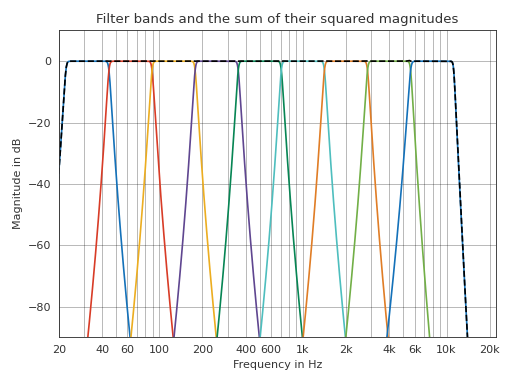
Examples
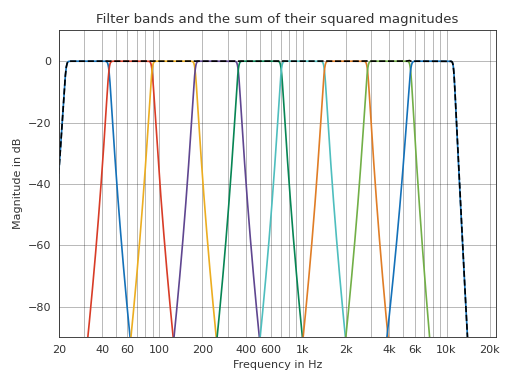
Filter an impulse into octave bands. The summed energy of all bands equals the energy of the input signal.
>>> import pyfar as pf
>>> import numpy as np
>>> import matplotlib.pyplot as plt
>>> # generate the data
>>> x = pf.signals.impulse(2**17)
>>> y = pf.dsp.filter.fractional_octave_bands(
...     x, 1, freq_range=(20, 8e3))
>>> # frequency domain plot
>>> y_sum = pf.FrequencyData(
...     np.sum(np.abs(y.freq)**2, 0), y.frequencies)
>>> pf.plot.freq(y)
>>> ax = pf.plot.freq(y_sum, color='k', log_prefix=10, linestyle='--')
>>> ax.set_title(
...     "Filter bands and the sum of their squared magnitudes")
>>> plt.tight_layout()
(Source code, png, hires.png, pdf)
- pyfar.dsp.filter.fractional_octave_frequencies(num_fractions=1, frequency_range=(20, 20000.0), return_cutoff=False)[source]
Return the octave center frequencies according to the IEC 61260:1:2014 standard. For numbers of fractions other than
1and3, only the exact center frequencies are returned, since nominal frequencies are not specified by corresponding standards.- Parameters
num_fractions (int, optional) – The number of bands an octave is divided into. Eg.,
1refers to octave bands and3to third octave bands. The default is1.frequency_range (array, tuple) – The lower and upper frequency limits, the default is
frequency_range=(20, 20e3).
- Returns
nominal (array, float) – The nominal center frequencies in Hz specified in the standard. Nominal frequencies are only returned for octave bands and third octave bands
exact (array, float) – The exact center frequencies in Hz, resulting in a uniform distribution of frequency bands over the frequency range.
cutoff_freq (tuple, array, float) – The lower and upper critical frequencies in Hz of the bandpass filters for each band as a tuple corresponding to
(f_lower, f_upper)
- pyfar.dsp.filter.high_shelve(signal, frequency, gain, order, shelve_type='I', sampling_rate=None)[source]
Create and/or apply first or second order high shelve filter.
Uses the implementation of 3.
- Parameters
signal (Signal, None) – The Signal to be filtered. Pass
Noneto create the filter without applying it.frequency (number) – Characteristic frequency of the shelve in Hz
gain (number) – Gain of the shelve in dB
order (number) – The shelve order. Must be
1or2.shelve_type (str) –
Defines the characteristic frequency. The default is
'I''I'defines the characteristic frequency 3 dB below the gain value if the gain is positive and 3 dB above the gain value otherwise
'II'defines the characteristic frequency at 3 dB if the gain is positive and at -3 dB if the gain is negative.
sampling_rate (None, number) – The sampling rate in Hz. Only required if signal is
None. The default isNone.
- Returns
signal (Signal) – The filtered signal. Only returned if
sampling_rate = None.filter (FilterIIR) – Filter object. Only returned if
signal = None.
References
- pyfar.dsp.filter.low_shelve(signal, frequency, gain, order, shelve_type='I', sampling_rate=None)[source]
Create and apply first or second order low shelve filter.
Uses the implementation of 4.
- Parameters
signal (Signal, None) – The Signal to be filtered. Pass None to create the filter without applying it.
frequency (number) – Characteristic frequency of the shelve in Hz
gain (number) – Gain of the shelve in dB
order (number) – The shelve order. Must be
1or2.shelve_type (str) –
Defines the characteristic frequency. The default is
'I''I'defines the characteristic frequency 3 dB below the gain value if the gain is positive and 3 dB above the gain value otherwise
'II'defines the characteristic frequency at 3 dB if the gain is positive and at -3 dB if the gain is negative.
'III'defines the characteristic frequency at gain/2 dB
sampling_rate (None, number) – The sampling rate in Hz. Only required if signal is
None. The default isNone.
- Returns
signal (Signal) – The filtered signal. Only returned if
sampling_rate = None.filter (FilterIIR) – Filter object. Only returned if
signal = None.
References
- pyfar.dsp.filter.peq(signal, center_frequency, gain, quality, peq_type='II', quality_warp='cos', sampling_rate=None)[source]
Create and apply second order parametric equalizer filter.
Uses the implementation of 5.
- Parameters
signal (Signal, None) – The signal to be filtered. Pass
Noneto create the filter without applying it.center_frequency (number) – Center frequency of the parametric equalizer in Hz
gain (number) – Gain of the parametric equalizer in dB
quality (number) – Quality of the parametric equalizer, i.e., the inverse of the bandwidth
peq_type (str) –
Defines the bandwidth/quality. The default is
'II''I'not recommended. Also known as ‘constant Q’
'II'defines the bandwidth by the points 3 dB below the maximum if the gain is positive and 3 dB above the minimum if the gain is negative. Also known as ‘symmetric’
'III'defines the bandwidth by the points at gain/2. Also known as ‘half pad loss’.
quality_warp (str) – Sets the pre-warping for the quality (
'cos','sin', or'tan'). The default is'cos'.sampling_rate (None, number) – The sampling rate in Hz. Only required if signal is
None. The default isNone.
- Returns
signal (Signal) – The filtered signal. Only returned if
sampling_rate = None.filter (FilterIIR) – Filter object. Only returned if
signal = None.
References
- pyfar.dsp.filter.reconstructing_fractional_octave_bands(signal, num_fractions=1, frequency_range=(63, 16000), overlap=1, slope=0, n_samples=4096, sampling_rate=None)[source]
Create and/or apply an amplitude preserving fractional octave filter bank.
Note
This filter bank has -6 dB cut-off frequencies. For sufficient lengths of
'n_samples', the summed output of the filter bank equals the input signal, i.e., the filter bank is amplitude preserving (reconstructing). This is usefull for analysis and synthesis applications such as room acoustical simulations. For an energy preserving filter bank with -3 dB cut-off frequencies seefractional_octave_bands.The filters have a linear phase with a delay of
n_samples/2and are windowed with a Hann window to suppress side lobes of the finite filters. The magnitude response of the filters is designed similar to 6 with two exceptions:The magnitude response is designed using squared sine/cosine ramps to obtain -6 dB at the cut-off frequencies.
The overlap between the filters is calculated between the center and upper cut-off frequencies and not between the center and lower cut-off frequencies. This enables smaller pass-bands with unity gain, which might be advantageous for applications that apply analysis and resynthesis.
- Parameters
signal (Signal, None) – The Signal to be filtered. Pass None to create the filter without applying it.
num_fractions (int, optional) – Octave fraction, e.g., 3 for third-octave bands. The default is
1.frequency_range (tuple, optional) – frequency range for fractional octave in Hz. The default is
(63, 16000)overlap (float) – Band overlap of the filter slopes between 0 and 1. Smaller values yield wider pass-bands and steeper filter slopes. The default is
1.slope (int, optional) – Number > 0 that defines the width and steepness of the filter slopes. Larger values yield wider pass-bands and steeper filter slopes. The default is
0.n_samples (int, optional) – Length of the filter in samples. Longer filters yield more exact filters. The default is
2**12.sampling_rate (int) – Sampling frequency in Hz. The default is
None. Only required ifsignal=None.
- Returns
signal (Signal) – The filtered signal. Only returned if
sampling_rate = None.filter (FilterFIR) – FIR Filter object. Only returned if
signal = None.frequencies (np.ndarray) – Center frequencies of the filters.
References
- 6
Antoni, J. (2010). Orthogonal-like fractional-octave-band filters. J. Acous. Soc. Am., 127(2), 884–895, doi: 10.1121/1.3273888
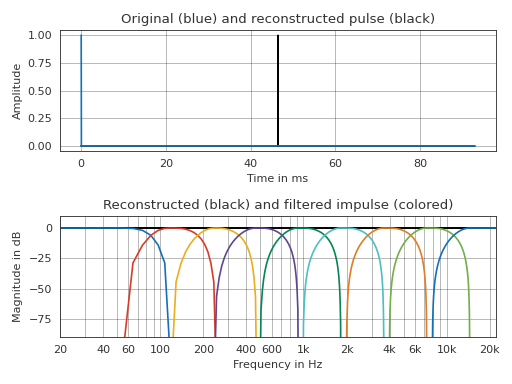
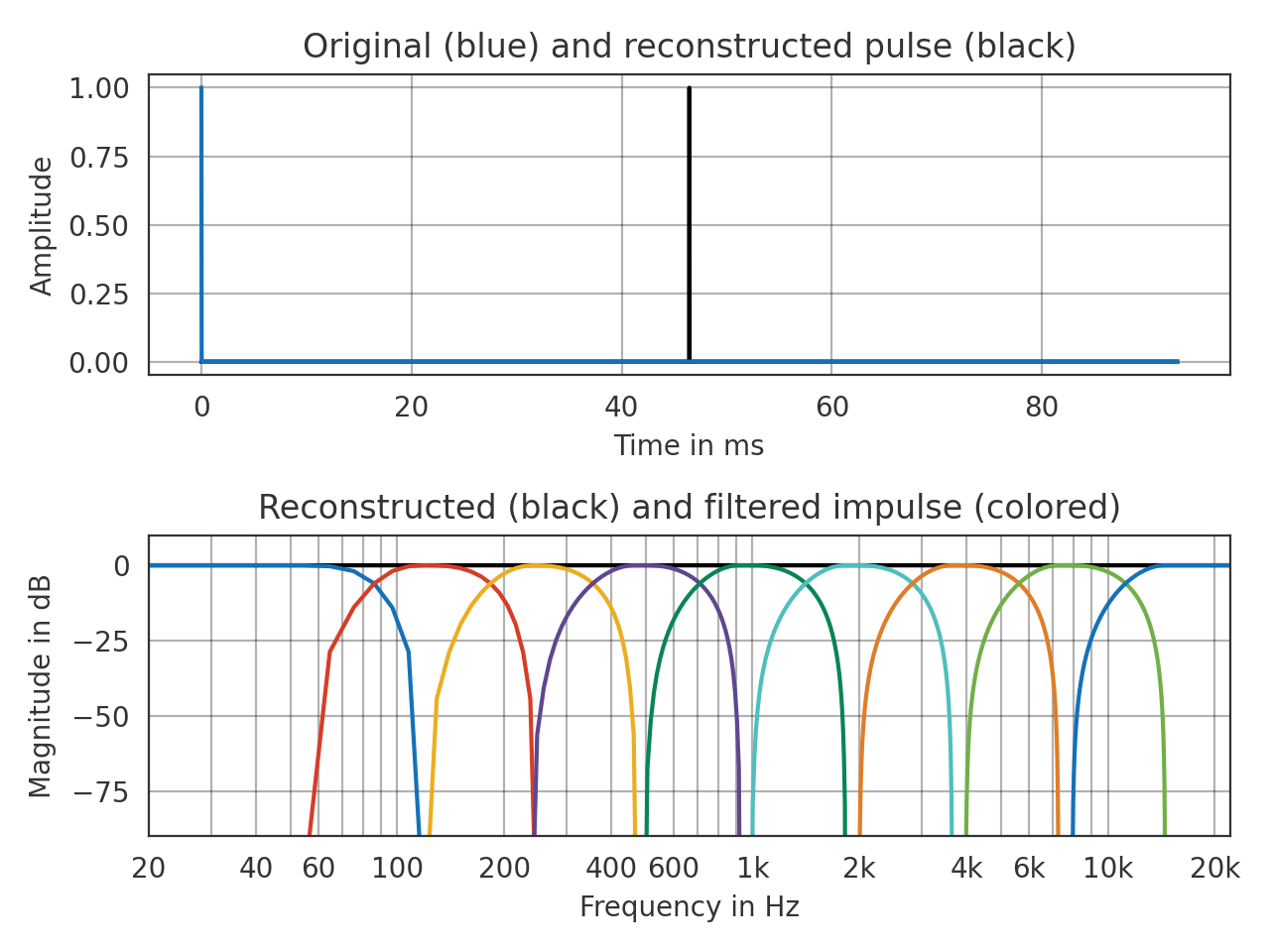
Examples
Filter and re-synthesize impulse signal
>>> import pyfar as pf
>>> import numpy as np
>>> import matplotlib.pyplot as plt
>>> # generate data
>>> x = pf.signals.impulse(2**12)
>>> y, f = pf.dsp.filter.reconstructing_fractional_octave_bands(x)
>>> y_sum = pf.Signal(np.sum(y.time, 0), y.sampling_rate)
>>> # time domain plot
>>> ax = pf.plot.time_freq(y_sum, color='k')
>>> pf.plot.time(x, ax=ax[0])
>>> ax[0].set_xlim(-5, 2**12/44100 * 1e3 + 5)
>>> ax[0].set_title("Original (blue) and reconstructed pulse (black)")
>>> # frequency domain plot
>>> pf.plot.freq(y_sum, color='k', ax=ax[1])
>>> pf.plot.freq(y, ax=ax[1])
>>> ax[1].set_title(
...     "Reconstructed (black) and filtered impulse (colored)")
>>> plt.tight_layout()
(Source code, png, hires.png, pdf)